LXD Case Study

HyperLXD: Learning Journey

HyperLXD was created to solve eLearning storyboarding fragmentation by offering a more intuitive, visual-first environment that blends instructional strategy with rapid prototyping and collaborative …

Client
HyperGraphik Design Inc.
Deliverable
AI-powered web application
Tools
Lovable
Timeline
3 days
My Role
Creative, Project Management
Read Case Study ← All Case Studies
HyperLXD web app
3 Days

0-100

15

Coffees

10

Activity Nodes

1

Hope

Overview

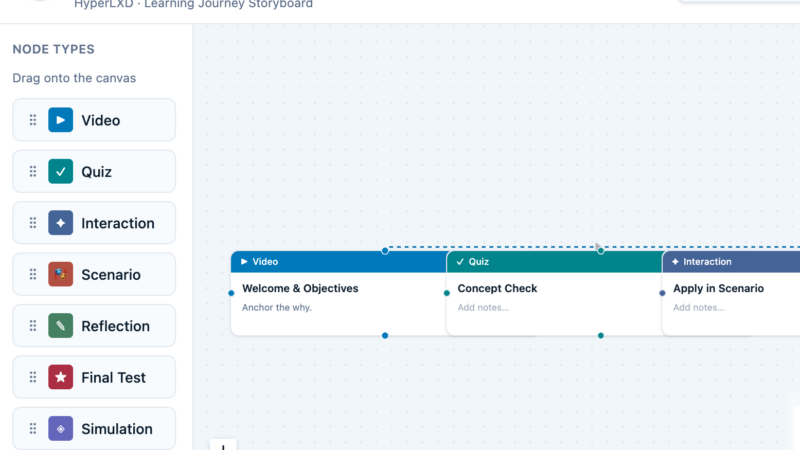
Designed as a visual node-based canvas, the app combines learning strategy, journey mapping, and exportable documentation into a single streamlined workspace. The platform transforms abstract learning concepts into interactive visual flows that are easier to build, review, and communicate across teams.

Live preview below!
Explore the full app here.

The Challenge

HyperLXD was created to solve eLearning storyboarding fragmentation by offering a more intuitive, visual-first environment that blends instructional strategy with rapid prototyping and collaborative thinking. The goal was to make learning design feel more like modern product and experience design.

Outcomes

HyperLXD demonstrates how AI-powered prototyping can accelerate the creation of specialized educational design tools without sacrificing usability or instructional rigor. The result is a polished proof of concept that showcases visual learning journey design, rapid iteration, and integrated instructional thinking in a single platform. The project highlights the potential of AI-assisted development workflows for creating functional, design-forward applications in a fraction of the time required by traditional development processes.

The Process

1

Prompting and Workflow

The app was developed using a rapid AI-assisted workflow in Lovable, combining iterative prompting, interface refinement, and UX experimentation.
promptsAIworkflow
2

Design Process

The design process focused heavily on usability and flexibility: draggable nodes, branching pathways, inline editing and responsive layouts.
designprocess
3

Strategy

Iinstructional strategy previews were all introduced to support fast ideation and real-time iteration.
strategy
4

Research

Research-backed instructional tactics were integrated directly into the workflow to ensure pedagogical value remained central to the experience.
Research

Key Decisions

Structure

One of the most important decisions was structuring the experience around a node-based canvas instead of a traditional linear storyboard.

Why: This allowed learning journeys to feel dynamic, modular, and adaptable.

Strategies

Another key choice was embedding instructional strategies directly into each node type.

Why: This was done so that the platform could guide both novice and experienced designers through best-practice learning design decisions.

Deliverables

Export functionality was also prioritized early.

Why: This was done to bridge the gap between ideation and stakeholder-ready deliverables.